 Success-Plan Services
 Kyle Benson

Many developers have already worked with IEEE 802.1 standards for Time-Sensitive Networking (TSN) and explored its unique benefits for data transmission over Ethernet networks. Here at RTI, we have long championed the synergy of combining TSN and the Data Distribution Service (DDS®) standard, as these two technologies are a natural fit for connecting distributed hard real-time systems.
Have you been wanting to get hands-on with a real DDS-TSN system, but haven’t had a starting point to reference? This blog post introduces you to the basic mechanics of how the DDS standard operates over TSN hardware and how to configure a Linux-based system to support this technology stack in the context of RTI Connext. It also summarizes an upcoming technical paper (available now by request via tsn@rti.com) that helps you dive into the details, set up a simple inexpensive DDS-TSN testbed, and reproduce our results yourself to validate your setup.
Getting started
This inexpensive testbed was designed to use the most basic of equipment readily available to anyone, whether a well-funded commercial department or an interested student without funding or a research lab to deploy in. By using a Raspberry Pi, Intel network card, and basic off-the-shelf components, each node is easily sourced and consistent enough for reproducible results. You could even assemble this testbed in a portable box for traveling to tradeshows or onsite customer visits.
Here's the purchase list for each host:
- Raspberry Pi 5 Model B (the 4GB RAM model is fine for basic testing)
- An appropriate power supply (NOTE: the Pi 5 requires more power to run than your cell phone requires to charge, so make sure you get something compatible)
- A microSD card suitable for running your operating system of choice (e.g., Debian 12 GNU/Linux)
- S2PI PCie Slot for raspberry pi 5 (only needed for publisher hosts)
- PCI Network adapter Intel I225v (only needed for publisher hosts)
You will also need a TSN switch of your choice if you plan to set up more than two nodes. We used a RELY-TSN4 switch from RelyUm with compatible RJ45 SFP modules, but any TSN-compatible switch should do.
Next, you can download and install RTI Connext for free: our Connext Express is a size-limited version ideal for evaluation and getting started. See this page for more options, including free access to our full product for university students, researchers, and teachers.
Configuring the DDS-TSN software
Being a data-distribution middleware, DDS manages the lower networking layers and configures them to differentiate and treat different packets/frames. DDS uses Quality of Service (QoS) policies to configure and mark the data streams so that the TSN hardware differentiates the Ethernet frames as they traverse the network, placing them into queues with different priorities. Hence, we pre-configure the physical network interface of the hosts, the TSN switch, and the DDS applications' QoS to all agree.
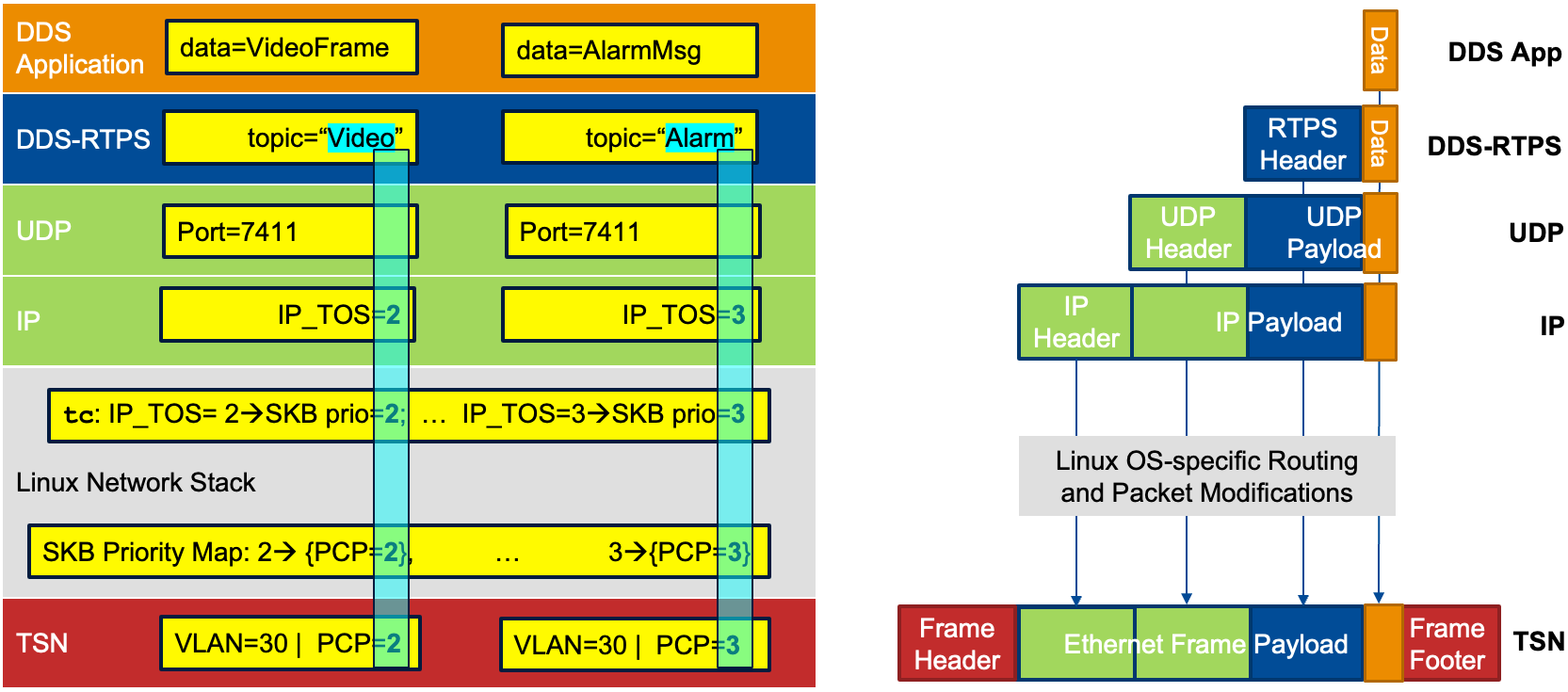
The following steps and diagram summarize how these configurations are mapped from DDS down the Linux network stack to TSN:
- DDS Packet: DDS creates an Internet Protocol packet with its Differentiated Services Code Point (DSCP) value set by the transport priority QoS setting.
- Traffic Control Filter: Linux applies a traffic control filter to assign the packet a priority based on the DSCP and route it to the appropriate network interface queue.
- PCP Value: The network queue assigns a 3-bit Priority Code Point (PCP) value to the Ethernet frame.
- VLAN Interface: The Ethernet frame is tagged with the VLAN ID and is sent over the designated VLAN interface. Using the same VLAN ID for different traffic streams enables the use of a single network interface in Linux.
- TSN Switch: The combined PCP value and VLAN ID map to a particular queue that applies pre-configured TSN traffic shaping policies.
Running the experiments
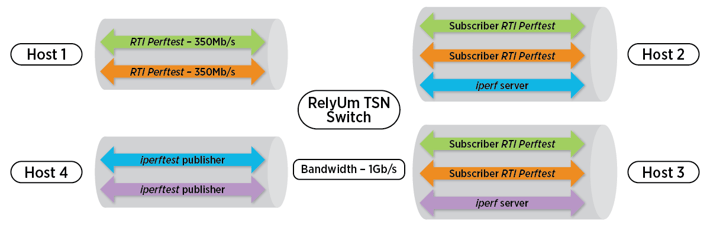
We suggest starting with the Credit-based Shaper (CBS) for TSN standardized in IEEE 802.1Qav. This will help you validate your setup with relatively simple configurations and off-the-shelf software utilities. We use RTI Perftest to measure the bandwidth achieved for two different DDS topics and the iperf Linux utility to generate background traffic. Without TSN CBS, iperf floods the network and disrupts the DDS traffic. With CBS enabled, the DDS topics achieve the exact bandwidth they were allocated by your CBS configuration and the iperf traffic gets what's left.
After you feel comfortable with CBS, set up IEEE 802.1as time synchronization between your hosts and give the Time-Aware Shaper from IEEE 802.1Qbv a try! Note that you will need to enable RT_PREEMPT in your Linux kernel if you plan to use the TSN Time-Aware Shaper.
Setting Up Your Own Testbed
Now that you understand the basics of this open testbed setup and you're ready to take on building your own, it's time to dive in! With the free-to-use RTI Connext options and the included command line snippets, you can set up the same DDS-TSN hardware testbed that we describe here using readily-available off-the-shelf components, plus your chosen switch. Once you feel comfortable with your setup as a baseline, you can expand on it to experiment with your specific domain, systems, and applications.
If you want access to the full technical paper with our exact command line snippets and results, have any questions, or just want to share your story with the TSN community at RTI, please do reach out to us at tsn@rti.com – we look forward to hearing about what you're building!
 Dr. Kyle Benson, Staff Research Engineer, conducts government funded research on RTI's Research Team. His PhD at UC Irvine explored middleware and configurable networks for mission-critical systems. He presented a brief talk about this DDS-TSN work at the IEEE Space Computing Conference on August 5, 2026.